Discord Integration
Connect your Discord server to Wakflo and automate server management, member administration, channel operations, and messaging workflows. Build powerful integrations that enhance your community engagement.
Authentication
Bot Token
Features
1 Trigger • 10 Actions
Available Triggers & Actions
Discord Triggers
Message Triggers
Message Triggers
- •New Message Received: Triggered when a new message is posted in a channel
Discord Actions
Available Actions
Available Actions
Channel Management
- •Create Channel: Create a new channel in your Discord server
- •Delete Channel: Remove a channel from your Discord server
- •Find Channel: Search for a specific channel in your Discord server
- •Rename Channel: Change the name of an existing channel
Member Management
- •Add Role to Member: Assign a role to a server member
- •Ban Guild Member: Ban a member from your Discord server
- •Find Guild Member: Search for a specific member in your Discord server
- •Remove Ban from User: Unban a previously banned user
- •Remove Member from Guild: Kick a member from your Discord server
Messaging
- •Send Message: Send a message to a Discord channel
Setup Guide
Connect to Wakflo
In Wakflo, select Discord integration and enter your bot token to establish the connection. You'll need to create a Discord bot first to get your token.
How to get your Discord Bot Token:
- Go to Discord Developer Portal
- Click "New Application" and give it a name
- Navigate to the "Bot" section in the left sidebar
- Click "Add Bot" if you haven't created one yet
- Under the Token section, click "Reset Token" or "Copy" to get your bot token
- Enable "Message Content Intent" under Privileged Gateway Intents
- Invite the bot to your server using OAuth2 URL Generator with proper permissions
Important: Keep your bot token secure and never share it publicly!
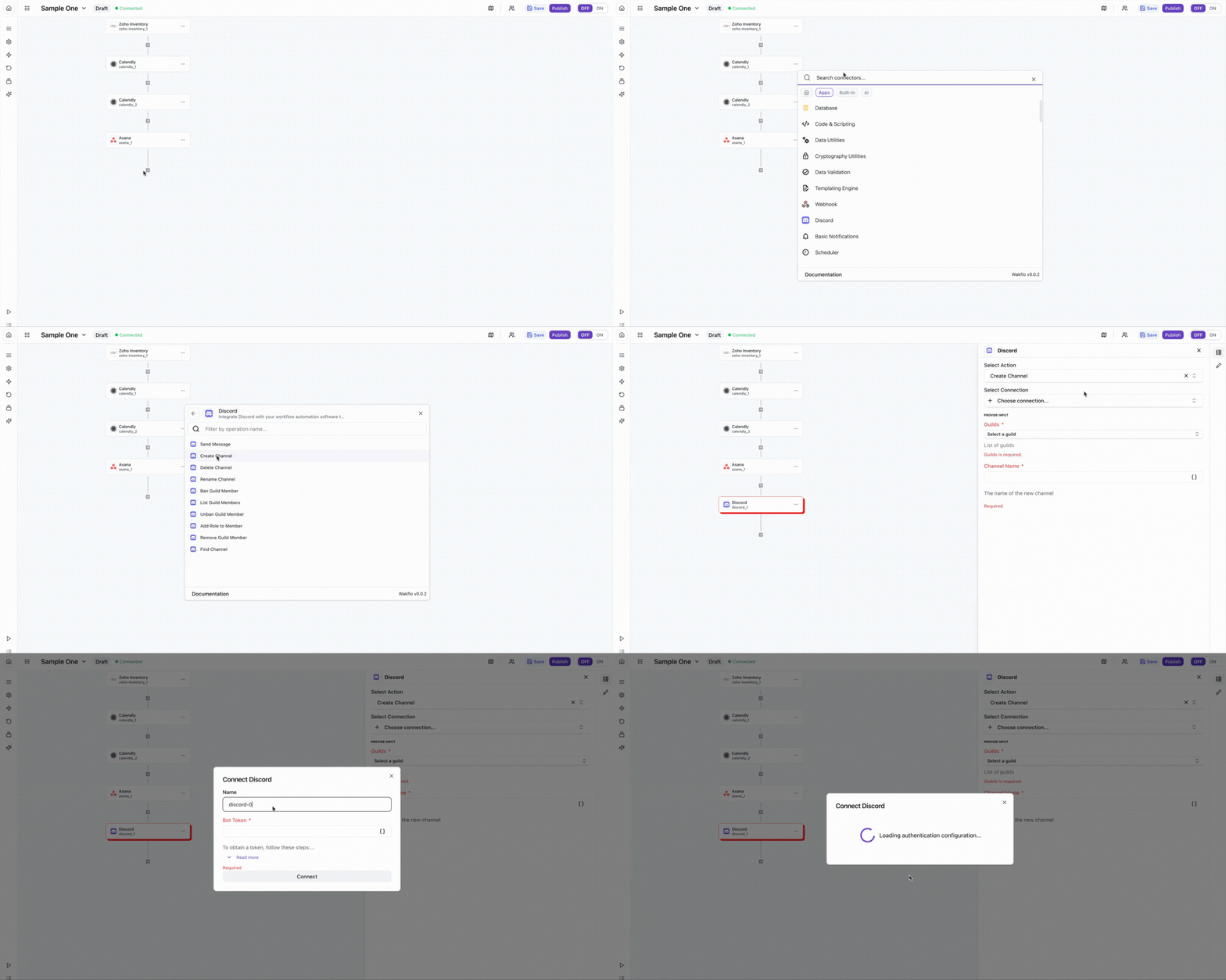
Test Connection
Verify the connection by sending a test message to ensure everything is working properly.
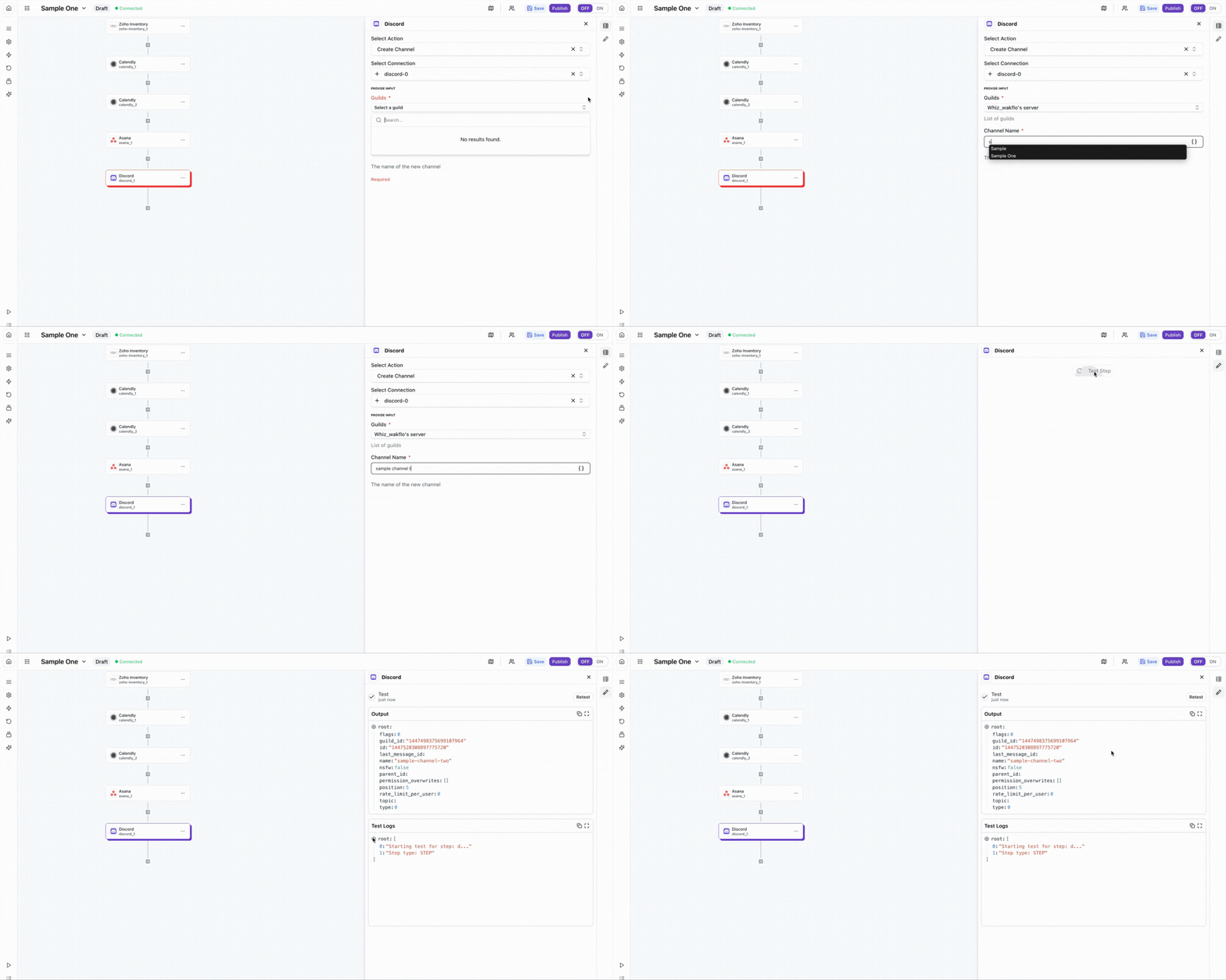
The Discord integration requires a bot token with appropriate permissions. Make sure to enable the necessary intents in the Discord Developer Portal and invite the bot to your server with proper permissions.
Best Practices
Working with Discord Data
- •Use Discord's markdown formatting for rich message content
- •Implement rate limiting to avoid hitting Discord's API limits
- •Use role-based permissions for better access control automation
- •Keep your bot token secure and rotate it if compromised
- •Test bot actions in a development server before production deployment
Troubleshooting
Authentication Issues
- •Verify that your bot token is valid and hasn't been regenerated
- •Ensure Message Content Intent is enabled in Discord Developer Portal
- •Check that the bot is properly invited to your server
Permission Issues
- •Ensure the bot has appropriate permissions for the action you're trying to perform
- •Verify that channel IDs and user IDs are correct and accessible to your bot
- •Check that the bot's role hierarchy allows it to manage other members
Rate Limiting
- •Discord enforces rate limits of 50 requests per second per guild
- •Implement delays between bulk operations to avoid rate limit errors
- •Use exponential backoff when receiving 429 responses
Additional Resources
Last updated on