TrackingMore Integration
Connect your TrackingMore account to Wakflo and automate shipment tracking across multiple carriers. Monitor packages and receive real-time updates for your ecommerce deliveries with powerful integration workflows.
Authentication
API Key
Features
1 Trigger • 2 Actions
Available Triggers
TrackingMore Triggers
Payment Triggers
Payment Triggers
- •New Payment: Triggered when a new payment is received
Available Actions
TrackingMore Actions
Tracking Actions
Tracking Actions
- •Create Tracking: Add a new tracking number to monitor across multiple carriers
- •Track a Package: Get real-time tracking information and delivery status for a package
Setup Guide
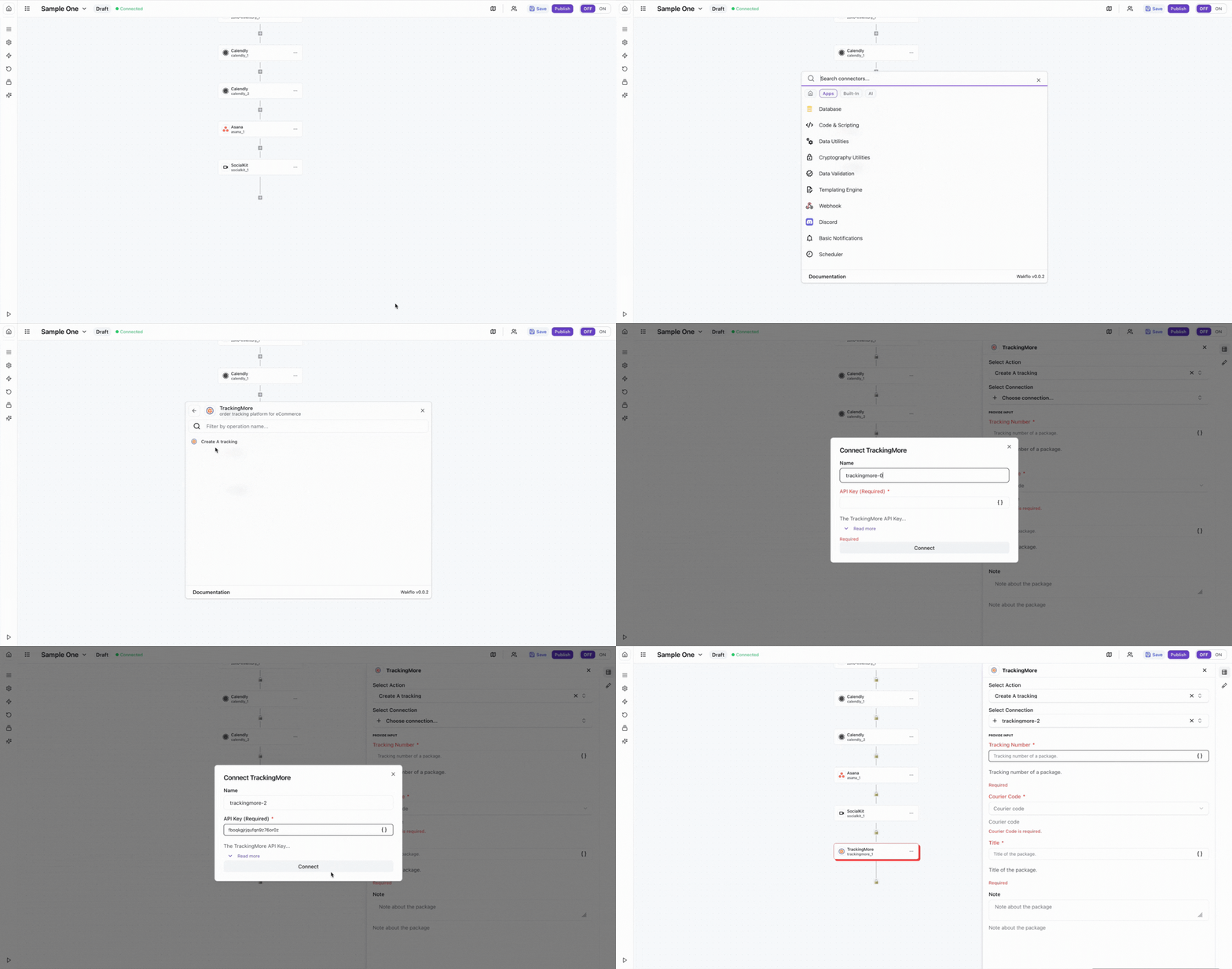
Connect to Wakflo
In Wakflo, select TrackingMore integration and enter your API key to establish the connection. You can find your API key in your TrackingMore account settings.
To get your API key, go to your TrackingMore account > Settings > API. Keep your API key secure and never share it publicly. Ensure you have an active subscription for access to multiple carrier tracking features.
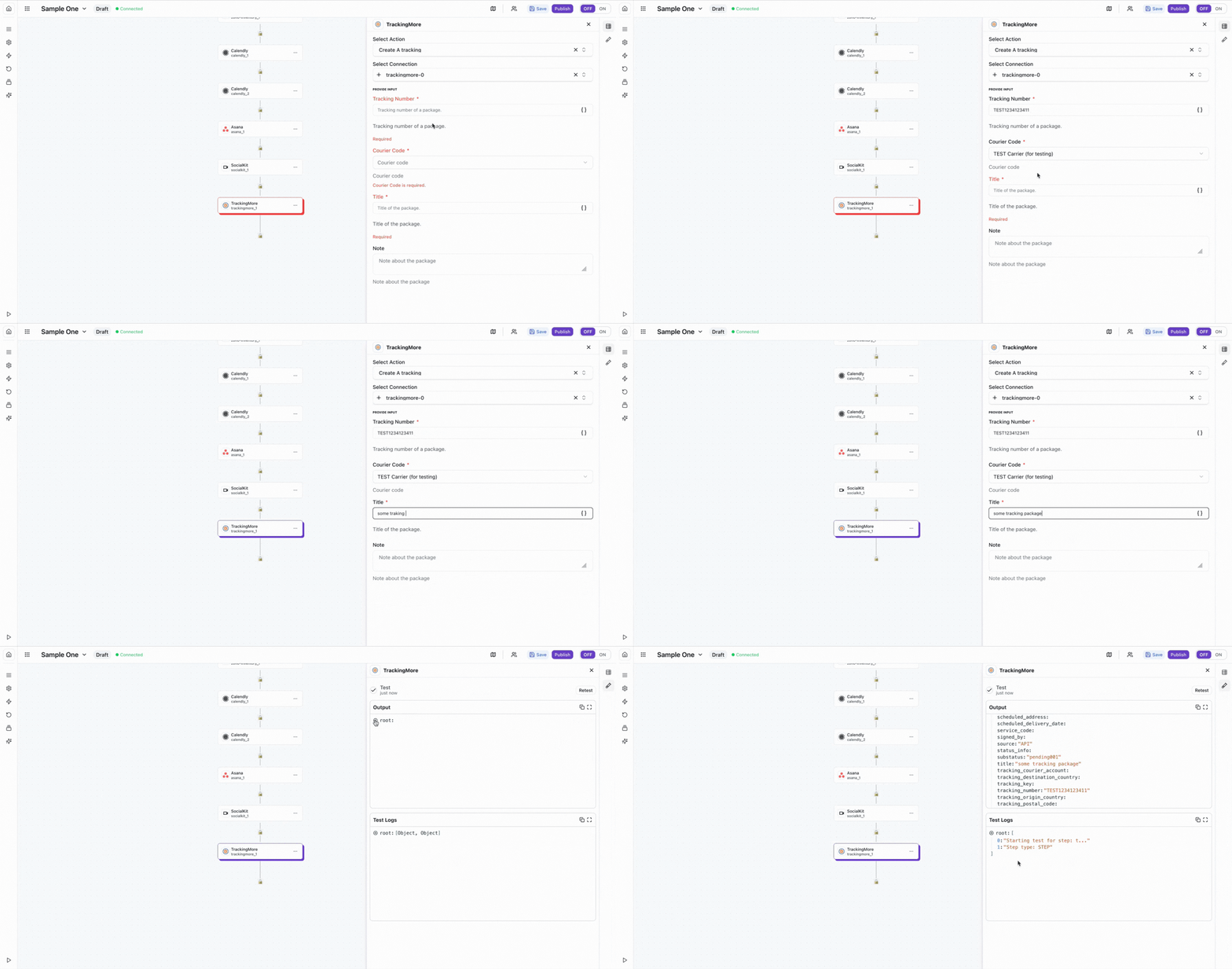
Test Connection
Verify the connection by retrieving test data to ensure everything is working properly.
The TrackingMore integration requires an API key. Make sure you have an active subscription for access to multiple carrier tracking features and real-time updates.
Best Practices
Shipment Tracking Best Practices
- •Always specify the correct carrier code when creating tracking entries for accurate results
- •Use webhooks for real-time tracking updates instead of frequent polling
- •Implement error handling for invalid or expired tracking numbers
- •Cache tracking data temporarily to reduce API calls and stay within rate limits
- •Monitor delivery exceptions and set up alerts for delayed or problematic shipments
- •Keep customer information updated with automated tracking notifications
- •Archive old tracking data to maintain optimal performance and database efficiency
- •Validate tracking numbers before creating entries to avoid unnecessary API consumption
Troubleshooting
Authentication Issues
- •Verify that your API key is valid and hasn't been revoked or expired
- •Ensure the API key is correctly copied without extra spaces or characters
- •Check that your TrackingMore subscription is active and in good standing
- •Verify that your account has API access permissions enabled
Tracking Issues
- •Ensure tracking numbers are in the correct format for the specified carrier
- •Verify that the carrier code matches the actual shipping carrier (e.g., 'ups', 'fedex', 'usps')
- •Check if the tracking number is active - some carriers have delays in updating their systems
- •Wait 24-48 hours after shipment creation for tracking data to be available
Webhook Configuration
- •Ensure your webhook URL is publicly accessible and returns a 200 status code
- •Verify webhook signature validation to ensure security and authenticity
- •Check webhook logs in TrackingMore dashboard for delivery failures
- •Implement retry logic for failed webhook deliveries
Rate Limiting
- •TrackingMore enforces rate limits based on your subscription plan
- •Implement exponential backoff when receiving 429 (Too Many Requests) errors
- •Monitor your API usage through the TrackingMore dashboard
- •Consider upgrading your plan if you consistently hit rate limits
Additional Resources
Last updated on